
I recently started playing around with Google Gemini's AI video generation tools.
If you haven't experimented with AI video generation yet, it's both amazing and a little terrifying.
For this article, I want to lean toward optimism.
Because whether we like it or not, AI video production is changing content creation. And if you're serious about telling stories, it's better to experiment than to hide.
So here's what I did.
The Setup: Six Photos From the Year 2000
Back in 2000, I attended an 8 week film and video workshop.
That's where I met my friend Jared. We were roommates during the workshop.
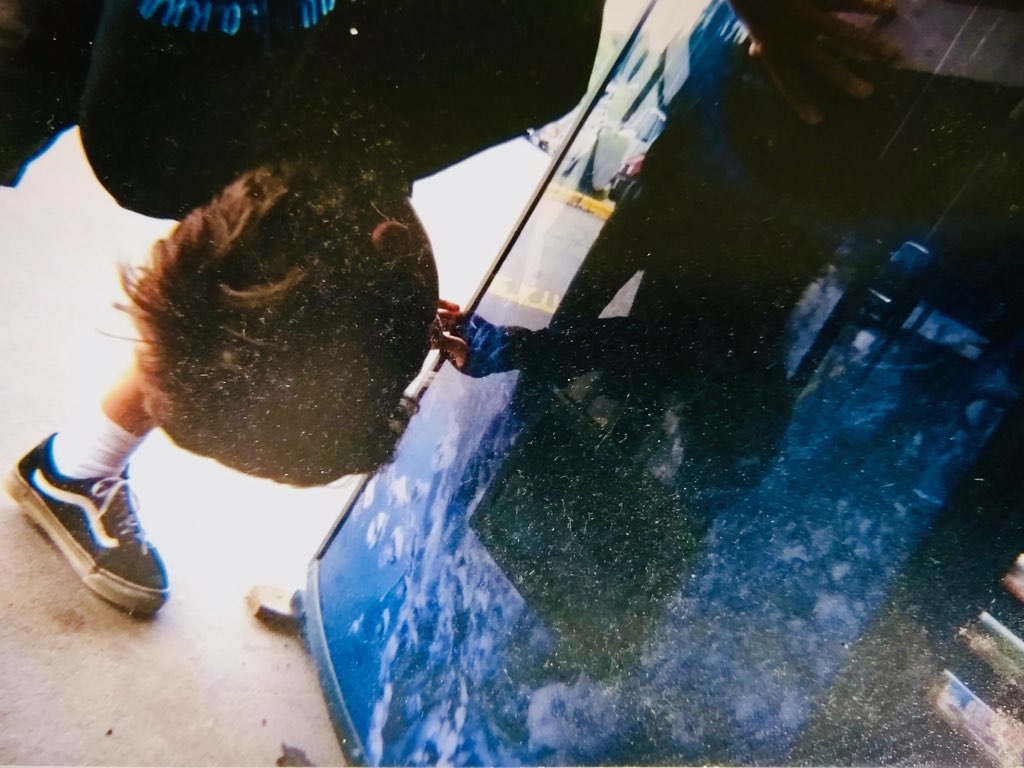
At one point, Jared took six photos of me trying to get a Pepsi. That was it. Just six still images.
A simple visual story. A guy. A soda machine. Mild frustration.
Recently, I upgraded my phone, and lost most of my images and videos… except for the following six photos. I have no idea why they were there.
Instead of ignoring them, I uploaded them into Google Gemini and asked it to turn those photos into AI-generated video.



Experiment #1: AI Face Swap Gone Wrong
For the first video, I decided to push things.
In addition to the Pepsi Machine photos, I also added a recent photo of my face.
I wanted to see if Gemini could map it onto my 25-year-old body from the year 2000. And the result was super wonky.
It took my younger body and blended it with something that looked like a distant-relative version of me. Fascinating, but definitely awkward.
👉 Watch Video 01 here:
Lesson learned: AI can blend faces. But it still struggles with identity, especially when you're asking it to reconcile two versions of the same person separated by decades.
Experiment #2: Turning Still Photos Into a Short AI Film
For the second video, I dropped the face swap experiment and just used the same six original photos.
My prompt was simple:
“Create a video of a frustrated man trying to get a Pepsi in the year 2000.”
That was basically it.
Gemini added motion between the still images, sound effects, voiceover, and basic narrative continuity.
The result was still imperfect, but more cohesive. It's more watchable.
And I think with better prompting and refinement, this image-to-video AI output could easily evolve into a nostalgic soda commercial or a short comedic piece.
👉 Watch Video 02 here:
Lesson learned: Dumb prompts create dumb videos. With practice, there is potential.
Experiment #3: AI Time Travel — Blending Timelines With Generative Video
After that video, I got more creative.
I decided to create a short science fiction moment using nothing but AI video generation from photos and a simple text prompt.
My prompt (again) was rough and not well-engineered.
I uploaded the same six Pepsi photos along with a recent video of my wife.
Then I prompted Gemini to bring my wife into the scene, have me give her the Pepsi, and let her reveal she's my future wife.
The result? Super awkward. Slightly uncanny. But interesting.
👉 Watch Video 03 here:
LESSON: Because now we're not just animating still images. We're blending timelines and experimenting with narrative continuity using generative AI.
And that's where this starts to get powerful.
What AI Video Generation Means for Independent Filmmakers
It's getting easier and easier to go from idea to a movie. These tools are going to keep getting better.
The specific platforms will change. Google Gemini, Runway, Adobe Firefly…
The names don't matter as much as the underlying shift.
It's getting easier and easier to go from idea to a movie. I can very much imagine a future where any fictional scenario you can think of can become a motion picture.
For independent filmmakers, this changes everything. And because I'm feeling optimistic today, here are three ways this can benefit you.
AI Expands Creative Access for Filmmakers
You don't need permission to prototype ideas anymore.
You can test story concepts using image-to-video AI tools before you spend a dime on production. Got a stack of old photos from a shoot that never went anywhere?
Feed them into an AI video generator and see what comes back.
Use it to pitch. Use it to brainstorm. Use it to test whether an idea has legs before you commit real resources.
AI Prompting Is Becoming a Real Filmmaking Skill
You don't have to be the best cinematographer or editor.
You just have to know what good looks like.
If you understand tone, pacing, story beats, and emotional arcs, you'll direct AI filmmaking tools better than someone who doesn't.
The people who've spent years studying story structure, shot composition, and audience psychology have a massive head start here… Even if they've never touched an AI tool before.
Access Doesn't Equal Quality
Anyone can generate AI video.
Very few will create something compelling.
The fundamentals still matter. You're going to need a clear story structure, emotional stakes, strong storytelling.
AI accelerates production. It doesn't replace taste. And taste is what separates filmmakers from everyone else clicking “generate.”
How To Get Better AI Video Results
My prompts were basic. Regardless of which AI video tool you use, here's how to get better output:
Be specific about tone and genre.
Define camera movement and shot types. Control narration and sound design. Outline clear story beats before you hit generate.
Think of your prompt like a shot list. The more precisely you describe what you want, the closer the AI gets to delivering it.
Even a 30-second AI video needs structure. That part is still on you… And it always will be.
The Real Takeaway for Filmmakers
I think we can both agree that the videos were imperfect and awkward…
But that's not the point.
What matters is I was able to turn six random photos from the year 2000 into three AI-generated videos… from my phone in a single sitting.
No crew. No budget. No editing software.
Now imagine that same process, but with better prompts, better source material, created by someone who actually knows what they're doing behind the lens.
Or in this case, behind the keyboard.
That's where this is heading.
The filmmakers who treat AI as another tool in the kit… The way they once treated digital cameras, nonlinear editing, and affordable DSLRs will keep telling stories.
The creators who think AI is a passing trend will miss out.
So dig out some old footage or photos. Open up whatever AI video tool you have access to. Write a rough prompt. Hit generate.
It won't be perfect. But you'll learn something. And the next one will be better.
That's how filmmaking has always worked.
If you are new to AI video generation, you probably have questions. I had them too. Below are the most common questions filmmakers and creators are asking about turning photos into AI generated videos, along with straight answers based on what I learned from this experiment.
-
Can you turn old photos into a video using AI?
Yes. That is exactly what I did. I took six still photos from the year 2000 and uploaded them into Google Gemini.
The AI analyzed the images and generated short videos with motion, sound effects, and even voiceover.
The results were not perfect, but they were surprisingly watchable for a first attempt with zero editing. -
How does Google Gemini turn photos into video?
You upload one or more photos into Gemini, write a text prompt describing the scene you want, and the AI generates a short video clip.
Gemini uses its Veo video model to add motion between still images, create transitions, and generate audio.
Think of your prompt as a set of directions. The more specific you are about tone, camera movement, and story beats, the better the output. -
Is AI video generation good enough for real filmmaking?
Not yet. At least not for polished, final output. But it is surprisingly useful for prototyping ideas, testing story concepts, and creating rough visual drafts before you commit real money to production.
Think of it like a sketchpad. You would not frame a rough sketch and hang it in a gallery, but it helps you figure out what the painting should look like. -
What is the best prompt to use for AI video generation from photos?
Be specific. Define the tone, genre, camera movement, and shot types. Describe the mood and the action. Outline story beats before you hit generate. Think of your prompt like a shot list.
The more detail you give the AI, the closer it gets to what you actually want.
My early prompts were vague and the results showed it. When I got more specific, the output improved. -
Can AI replace filmmakers?
No. AI can generate video, but it cannot replace taste. Anyone can click generate. Very few people will create something worth watching.
The fundamentals still matter.
Clear structure, emotional stakes, and strong storytelling are what separate a compelling piece from a forgettable one. AI is a tool, not a filmmaker. -
What AI tools can turn photos into videos?
Google Gemini, Adobe Firefly, Runway, Luma AI, and several others all offer some form of image to video generation.
The specific tools will keep changing and improving. What matters more than the platform is learning how to prompt well and understanding what makes a good visual story.
Those skills transfer no matter which tool you use. -
Do you need video editing skills to use AI video generation?
Not to generate a basic clip.
Most AI video tools are designed so you can upload a photo, write a prompt, and get a result without touching editing software. But if you want to create something that actually connects with an audience, you need to understand story structure, pacing, and visual storytelling.
The editing skills are less important than the filmmaking instincts. -
Can AI add sound and voiceover to video generated from photos?
Yes. Google Gemini added sound effects, voiceover, and basic audio design to the videos it generated from my still photos.
I did not upload any audio files. The AI created all of it based on my text prompt.
The audio was not studio quality, but it added a surprising amount of narrative weight to what started as six silent images. -
How long are AI generated videos from photos?
Most AI video tools currently generate clips between five and ten seconds. Google Gemini produces eight second clips.
That sounds short, but it is enough to test a concept, create a social media clip, or build a rough storyboard.
As these tools improve, expect the length and quality to increase. For now, think of them as building blocks, not finished films. -
Is AI video generation free?
Some tools offer free tiers with limited features. Google Gemini requires a Google AI Pro or Ultra subscription to access video generation.
Other tools like Runway and Adobe Firefly have their own pricing models.
The cost of entry is low compared to traditional production, but most serious tools require a paid plan to get the best results.
AI Video Generation Glossary for Filmmakers
If some of the terms in this article were new to you, you are not alone. AI video generation comes with its own vocabulary, and it is changing fast. Here is a quick glossary of the key terms mentioned above so you can follow along and start experimenting with confidence.
AI Video Generation: The process of using artificial intelligence to create video content from inputs like text prompts, still images, or existing footage. Instead of filming and editing by hand, you describe what you want and the AI builds it for you.
Google Gemini: Google's AI assistant that now includes video generation powered by its Veo model. You can upload photos, write a prompt, and Gemini will generate short video clips with motion and audio.
Image to Video AI: A category of AI tools that take one or more still images and turn them into moving video. You provide the photos. The AI figures out how to animate them, adding motion, transitions, and sometimes sound.
Text Prompt: The written instruction you give an AI tool to tell it what to create. In AI video generation, your prompt is like a combination of a script and a shot list. The more specific you are about tone, action, and camera movement, the better the result.
Narrative Continuity: The principle that a story should flow logically from one moment to the next. In traditional filmmaking, this is maintained through editing and shot selection. In AI video, the tool attempts to create continuity between images or scenes based on your prompt.
Face Swap: An AI technique that maps one person's face onto another person's body in a photo or video. The technology works, but as my first experiment showed, the results can be awkward when the AI does not fully understand the identity it is working with.
Generative AI: A broad category of artificial intelligence that creates new content rather than just analyzing existing content. When an AI tool generates a video, writes a voiceover, or adds sound effects that did not exist before, that is generative AI at work.
Story Beats: The key turning points and emotional moments that make up the structure of a story. Even in a 30 second AI generated video, defining your story beats before you start prompting will give you a more watchable result.
Voiceover: Narration added over video footage. In the context of AI video generation, the voiceover is created by the AI based on your text prompt. You do not need to record anything yourself. The AI generates the voice, the tone, and the delivery.
Prototyping: Creating a rough, quick version of an idea to see if it works before investing real time and money. In filmmaking, this might mean shooting test footage or building a rough storyboard. With AI video tools, you can now prototype a concept by uploading a few images and writing a prompt.

